
Removing Users from an Organization
An Organization Admin can remove a team member through Manage team members. Before you confirm, Shout shows which forms will move to the account owner, which private forms will be deleted, and the effect on colleagues and email campaigns.
To keep a departing member’s private forms, move them into a shared Workspace before deleting the member. When the member is deleted, their Workspace forms are reassigned to the primary account owner named in the confirmation window. Their forms outside Workspaces are deleted with their account.
What is kept and what is deleted?
Section titled “What is kept and what is deleted?”| Work | What happens when you delete the member |
|---|---|
| Their forms in a Workspace | The forms and their responses stay available in that Workspace. Ownership moves to the primary account owner; you do not choose a replacement owner in this dialog. |
| Reports they created on forms that survive | These reports are also reassigned to the account owner, including the member’s reports on colleagues’ forms. |
| Their private forms outside Workspaces | The forms and their data are deleted with the member. This includes forms shared through individual collaborator invitations. |
| Campaigns linked to those private forms | These campaigns are deleted, including campaigns created by another colleague. Shout requests cancellation of scheduled or ongoing sends before deletion; emails already sent cannot be recalled. |
| Other campaigns created by the member | These are reassigned to the account owner. Their existing Workspace access remains in effect. |
The account owner is the account’s primary owner, which may be a different person from the Admin performing the removal. Check the name shown in the confirmation.
1. Prepare the shared Workspace
Section titled “1. Prepare the shared Workspace”Choose an existing Workspace or create one for the handover. Make sure the colleagues who will keep using the forms have access, including someone who can manage the Workspace after the member leaves.
See How to Collaborate on Projects for membership. An Organization Admin has access to all Workspaces; other members gain access through individual membership, groups or the everyone setting.
2. Move the member’s private forms before removal
Section titled “2. Move the member’s private forms before removal”Long-standing team accounts may contain years of forms outside shared Workspaces. Review these before removing anyone.
- Ask the member to open Forms, or access their account as an Organization Admin using Impersonate.
- Choose Personal in the workspace selector (My Forms in older layouts) and find the private forms the team needs to keep.
- Tick the checkbox beside each form, then click Move in the action bar.
- Choose the named shared Workspace and click Move. The no-workspace option leaves forms private; use a named Workspace for the handover.
- Read the notification and check the destination. A bulk move can succeed for some forms and fail for others, so resolve any failures.
- Review forms shared through older individual invitations too. Restore any recently deleted form you need to keep before moving it into a Workspace.
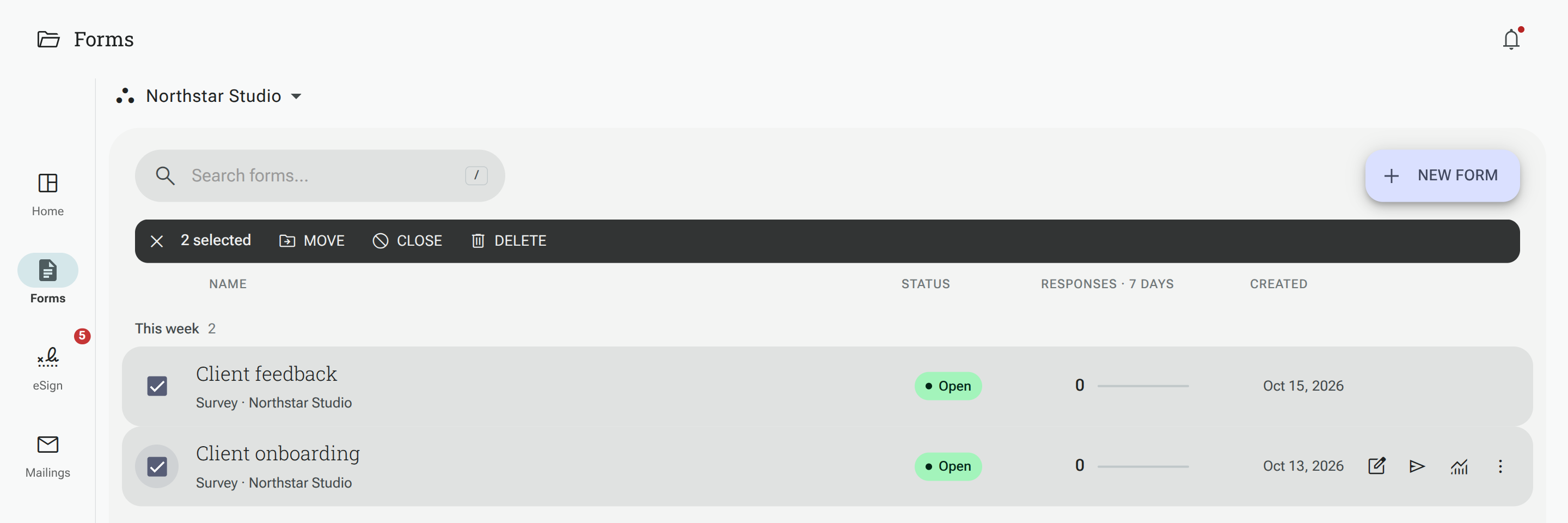
The account doing the move needs access to the destination. If you are impersonating the member, arrange their Workspace access first. Moving forms also moves their linked email campaigns to the same Workspace, so review who will be able to access those campaigns.
See Moving a Project to a Workspace for the full steps.
3. Verify the handover
Section titled “3. Verify the handover”End impersonation with Back to my account. Open the shared Workspace from your Admin account and have a remaining team member check access too. Open the forms, their Results, and any custom reports the team needs. Check the linked campaigns in Mailings, including drafts, schedules and sent reports.
Also review work that is not covered by the form-and-campaign handover: contacts or other work assigned to the member, reusable templates and uploaded assets, and any external account or credentials they control. The deletion preview covers forms and campaigns; it is not an inventory of every setting or connected service in the account.
For forms with Actions, check that their connected apps are available to the destination Workspace. Actions remain attached to the form after a move, but a step cannot use a connection that is unavailable in its new Workspace. Review any step marked unavailable or needing attention.
4. Review the deletion preview and confirm
Section titled “4. Review the deletion preview and confirm”- Click your profile icon and select Account details.
- Under My organization, click Manage team members.
- Select the member, then click Delete to open their deletion preview.
- Review the named account owner, the number of Workspace forms that will move, the private forms that will be deleted, any warning that colleagues will lose access, and the number of linked campaigns that will be deleted.
- If a private form should be kept, cancel the removal or use Impersonate [member] in the preview, move it into a Workspace, then return and reopen Delete to review the updated counts.
- If anything will be deleted, type the member’s email address as shown in the confirmation field. If there are no private forms or linked campaigns to delete, no typed confirmation is required.
- Click Delete member when the preview matches your intention.
Shout checks the private-form and campaign deletion counts again when you confirm. If they have changed, the removal is refused and the preview refreshes so you can review and confirm again.
When removal is blocked
Section titled “When removal is blocked”- You cannot delete yourself from this screen.
- The primary account owner cannot be deleted as a team member.
- If work needs to be handed over but no active account owner is available, removal is blocked. Contact support using the message shown.
- If Shout cannot load the forms-and-campaigns check, close the window and try again before continuing.
After removal, check the kept forms, reports and campaigns from a remaining account. Review respondent and public-report links for any work still in use.