
List of Contact Details Elements
A respondent’s demographic information can be as essential to analyzing your project results as the question responses themselves. Depending on what you wish to accomplish with your project, you could use this information to develop your understanding of your respondents, or simply compile a customer database.
In the builder, click ‘Question’ to open the question type picker — Contact Details questions are grouped in their own category, with a description that these questions update the contact record and prefill when details are known:
- Address Lookup
- Compact Contact Form
- Full Name
- Telephone number
- Email address
- Language
Note: A dedicated standalone “Web Address” element is no longer offered in this category. To collect a URL, add a Text Box (single) question and set its Input Limitation to ‘Web Address’ — see Text Box (single).
Each of these questions can be linked to a field on the respondent’s contact record via the ‘Link to Contact detail’ setting, so that answers prefill automatically when the respondent is already known and update the CRM contact when submitted. If a contact field is already linked elsewhere in your form, that option is hidden from the picker to avoid duplicate links.
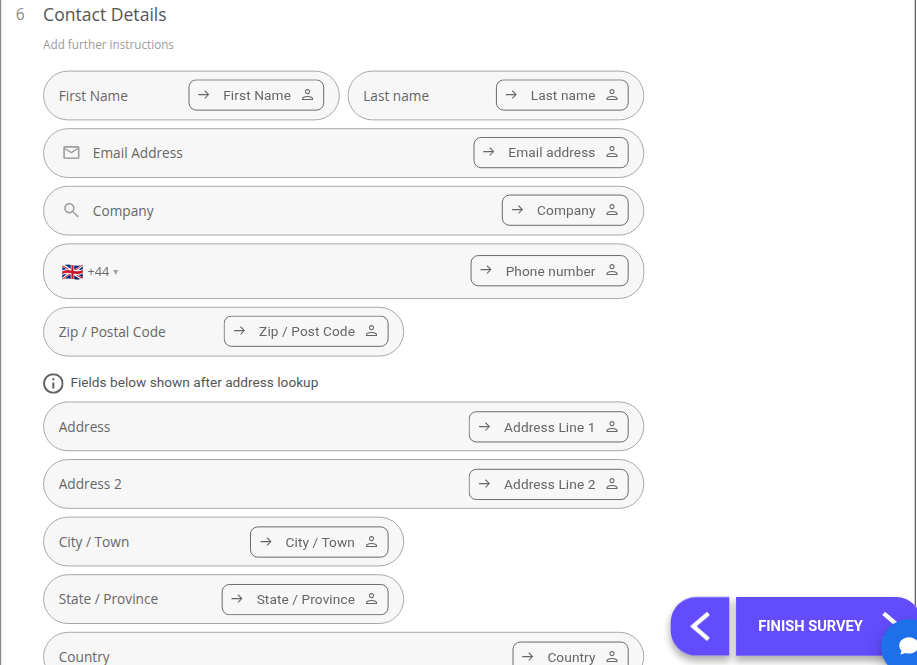 This is the multi-field option, used to collect a range of personal information from respondents in one question. By default it includes:
- First Name, Last name
- Email Address
- Company
- Phone Number (with country code selector)
- Zip/ Postal Code
- Address, Address 2, City/Town, State/Province, Country (revealed after an address lookup or by clicking ‘Manual entry’)
Each field is individually editable and linked to its own contact field.
Note: If you do intend on collecting respondent information, you may want to inform participants of the reason you are doing so.
Alternatively, a Consent Form could be included in your project to gain permission to collect this sensitive information.
Address Lookup
Section titled “Address Lookup” This method of collecting contact information focusses solely on the location of your respondents. By default, respondents are shown only a ‘Zip/ Postal Code’ field with a search icon.
Clicking the search icon looks up the address; alternatively, respondents can click the ‘Manual entry’ link to reveal the full set of fields:
- Address
- Address 2
- City/ Town
- State/ Province
- Zip/ Postal Code
- Country
 The aim of this question is to collect an email address from respondents, to be stored with the rest of your results. Email addresses are a valuable marketing tool for engaging audiences and promoting your products or services.
On top of this, email is likely to be the preferred form of contact for a lot of respondents. By default this question is already linked to the contact record’s Email address field.
Full Name / Telephone number / Language
Section titled “Full Name / Telephone number / Language”These are single-field Contact Details questions, added the same way as Address Lookup and Email address above — pick them from the Contact Details category in the question picker. Each inserts one field (a name box, a phone number box with country code selector, or a language drop-down respectively) pre-linked to the matching contact field.