
Numeric Slider
The Numeric Slider question type allows you to respondents to select a value using a slider.
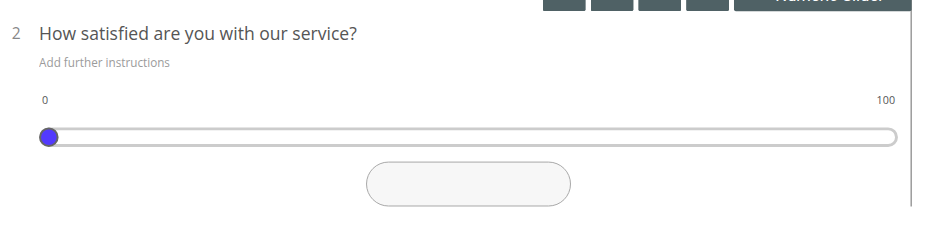
Numeric Slider Question Settings
Section titled “Numeric Slider Question Settings”Click “Show more settings” beneath the question to reveal the full settings panel:
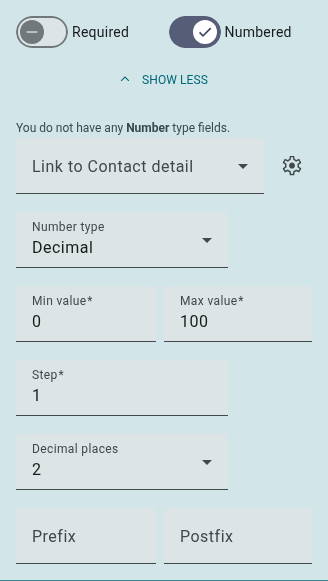
- Required: Require respondents to answer this question before submitting a response.
- Number Type: Switch the accepted input values between Integer, Decimal (the default) and Currency.
- Min Value: Set a minimum value for the slider. Required — defaults to 0.
- Max Value: Set a maximum value for the slider. Required — defaults to 100.
- Step: Define a value that controls the interval the slider moves by. Required — defaults to 1.
- Decimal Places: Customize the number of decimal places a respondent can input (defaults to 2).
- Prefix: Add a word, letter, number or symbol to appear before the input value.
- Postfix: Add a word, letter, number or symbol to appear after the input value.
- Numbered: Enable/disable the question numbering.
The Personal Info toggle (for Pseudonymization) only appears in this panel once Pseudonymization has been enabled for the survey under Settings > Privacy & Security.
Numeric Slider Results
Section titled “Numeric Slider Results”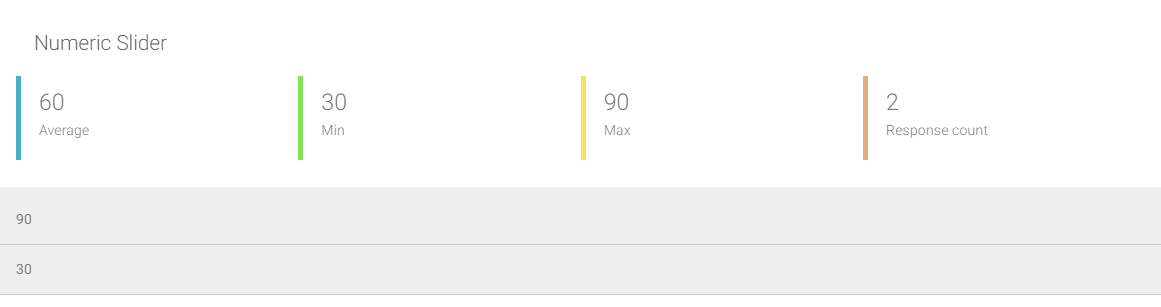 The below data will be available for the Numeric Slider question type:
- Average: The average value of all respondent inputs.
- Min: The smallest value input.
- Max: The largest value input.
- Response count: The total number of responses for this question.
- Numeric responses: A list of all individual answers (displayed below aggregated data).