
Unsubscribed and Bounced Contacts
You may find that some of your contacts are marked as unsubscribed, bounced, or flagged for spam complaints in Contacts.
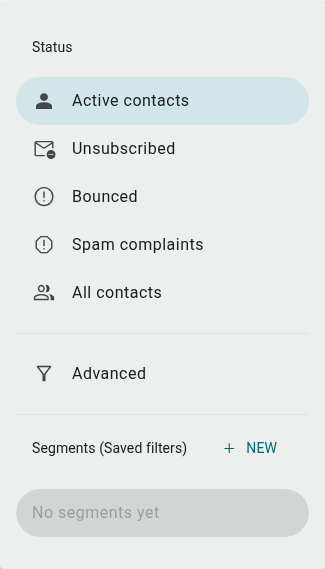
Unsubscribed contacts
Section titled “Unsubscribed contacts”We require that all emails you create contain an unsubscribe link so that contacts can opt-out of your mailings.
Once a contact clicks this link, they will be labeled as unsubscribed and you will no longer be able to send them emails.
Finding unsubscribed contacts
Section titled “Finding unsubscribed contacts”To get a list of all your unsubscribed contacts:
- Go to Contacts
- Click the Active contacts dropdown at the top of the list
- Select Unsubscribed
Resubscribing contacts
Section titled “Resubscribing contacts”To resubscribe a contact, so you can start sending them campaigns again, just:
- Follow the steps above to find your unsubscribed contacts
- Click the contact you wish to resubscribe (this will take you to their contact profile)
- Click the ⋮ (more actions) icon on their profile card and select Subscribe
- Confirm the resubscription
There’s no way to bulk resubscribe contacts.
Bounced contacts
Section titled “Bounced contacts”Hard bounces occur when there is a permanent reason that emails can’t be delivered to an address. These most commonly occur when:
- There is a typo in the email address
- The email address does not exist
- The receiving server has blocked emails from our domain or your address
Finding bounced contacts
Section titled “Finding bounced contacts”To get a list of all your bounced contacts:
- Go to Contacts
- Click the Active contacts dropdown at the top of the list
- Select Bounced
Spam complaints
Section titled “Spam complaints”Contacts who report one of your emails as spam are also tracked separately. To find them:
- Go to Contacts
- Click the Active contacts dropdown at the top of the list
- Select Spam complaints
If you want to keep any of these filtered lists, click Advanced in the same dropdown to open the filter builder, then Save filter as segment. Give it a name and you’ll be able to access this list from the Segments (Saved filters) section of the same dropdown at any time.