
Connected app security and privacy
Does Shout store my app password or API key?
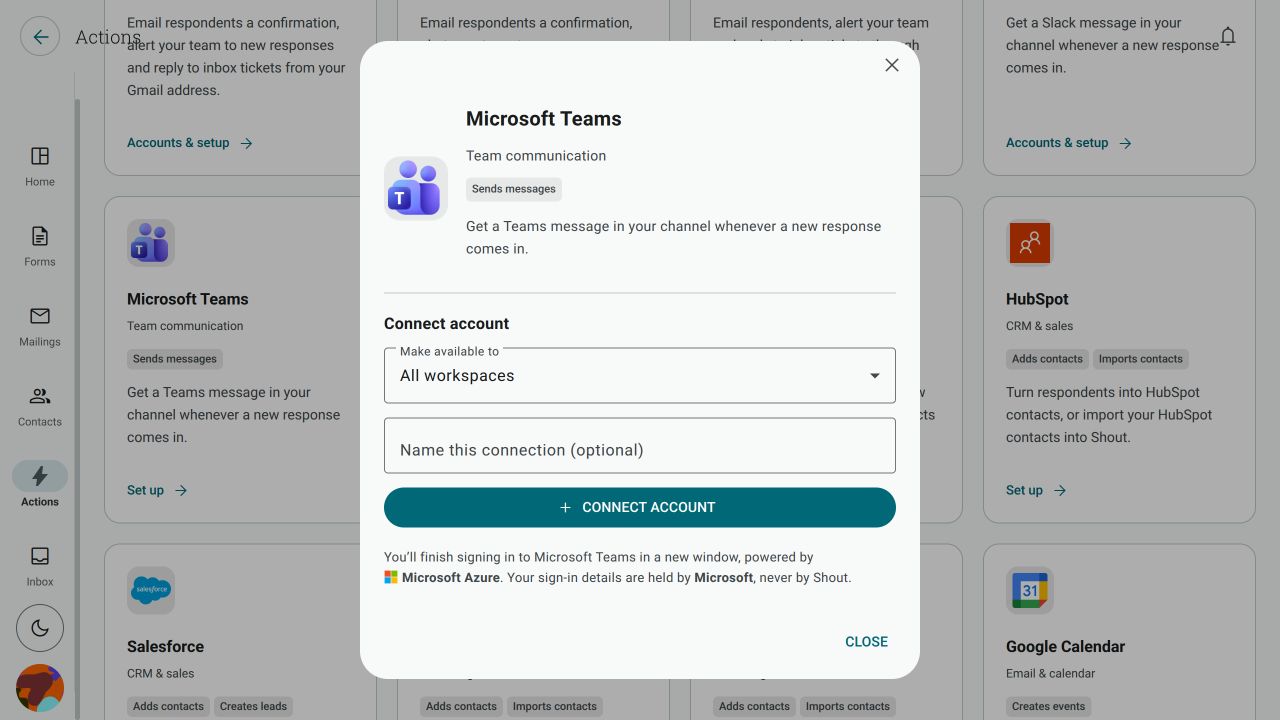
Section titled “Does Shout store my app password or API key?”The connection method depends on the app. If the connection dialog says that sign-in is powered by Microsoft Azure, follow that app-specific disclosure and the permissions shown on Microsoft’s consent screen. Other apps use a different, native Shout connection flow. Do not infer where a password, API key or token is stored from the app name; use the disclosure for that connection.
The consent screen and the Action steps show what the connection can do. Review those details for the specific app before approving it; the requested permissions vary by app.
Why does sign-in mention Microsoft Azure?
Section titled “Why does sign-in mention Microsoft Azure?”Some connected-app dialogs identify Microsoft Azure as the service powering that sign-in. That wording applies only to the app whose dialog shows it; it does not mean you need an Azure subscription to use every connected app. Other apps use Shout’s native integration path.
What does Shout send to a connected app?
Section titled “What does Shout send to a connected app?”Only the values used by the Action’s configured steps are sent. That can include selected form answers, contact details, ticket details, fixed text and the destination selected in the step. Review the fields and variables in each step before enabling it.
Does connecting an app give Shout access to everything in my account?
Section titled “Does connecting an app give Shout access to everything in my account?”Not automatically. The app’s consent screen lists the permissions requested for that connection, and the Action can use only the operations exposed by the connected app and selected step. Review the consent screen carefully; the requested permissions vary by app.
What does “created by” a long ID mean on the consent screen?
Section titled “What does “created by” a long ID mean on the consent screen?”That identifier is the application identity used by Shout’s connection service. It is not your password, your workspace ID or a second account you need to create. Confirm that the consent screen names the app and permissions you expect before approving it.
How do I revoke access completely?
Section titled “How do I revoke access completely?”First disconnect the account from Actions → Connected apps. Then, if you want to remove the authorisation entirely, open the app’s account security or connected-app settings and revoke Shout’s access there as well. The app’s own settings are the final authority for whether an authorisation has been revoked.
Disconnecting does not delete records already sent to that app.