
Test an Action before turning it on
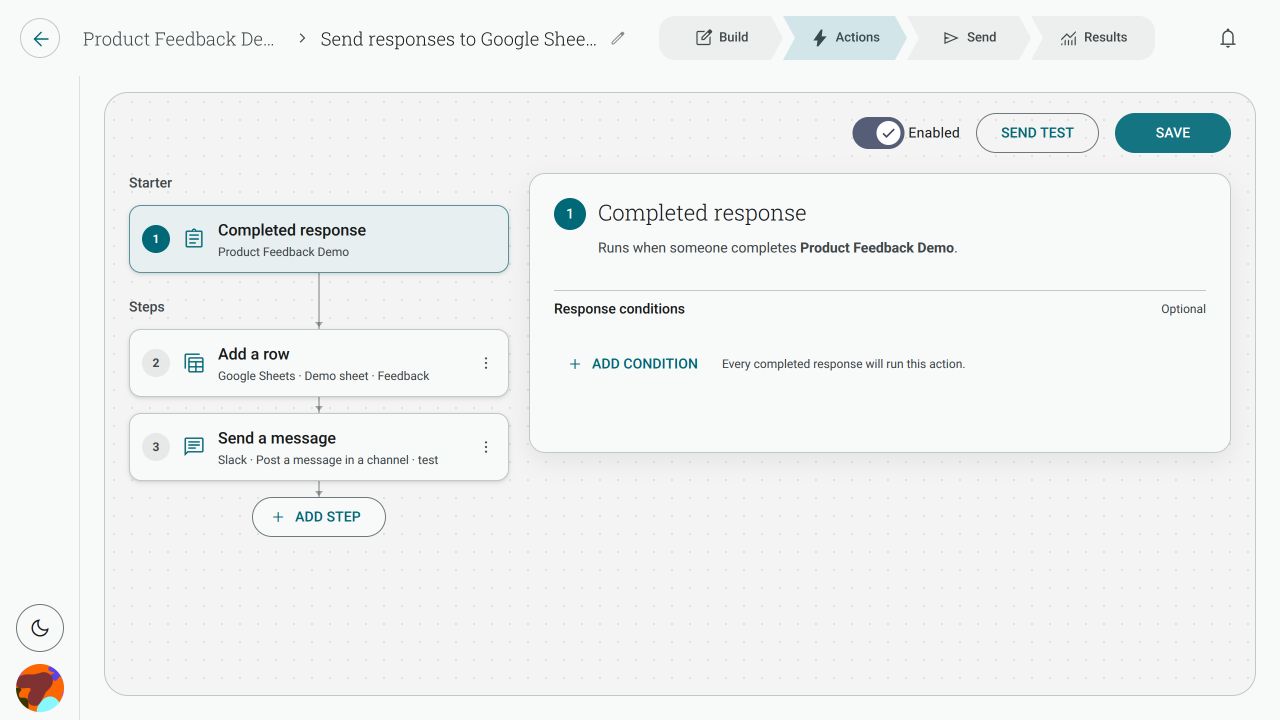
Use Send test in the Action editor to run a saved Action once with one of the form’s recent completed responses. A test is a real run, not a preview.
Does Send test really write to my app?
Section titled “Does Send test really write to my app?”Yes. The test makes a real change in the connected app. It can add a spreadsheet row, post a chat message, create a ticket, or make another change selected by the steps.
Use a scratch channel, sample sheet or other safe destination while you test. Review the mapped values before running the test, and remember that the Action does not need to be enabled for a test to make a change.
Why is the test button disabled?
Section titled “Why is the test button disabled?”Save the Action first, then check that:
- the starter and form are selected;
- every step is complete;
- each required destination and mapping has a value; and
- the connection used by each step does not need attention.
If you have just changed the Action, Send test remains unavailable until those edits are saved.
What does checking the connection do before a test?
Section titled “What does checking the connection do before a test?”Before the first write, Shout checks the connected apps used by the Action and preflights each step. This checks what Shout can safely validate, such as whether the connection and destination are still available and whether the saved step configuration is usable. If preflight fails, the test stops before it writes the first step.
Preflight cannot guarantee that a third-party app will accept a request or that a remote service will remain available for the whole run.
What if the test fails halfway through?
Section titled “What if the test fails halfway through?”Steps run in order. Changes made by successful steps are not rolled back. In form and contact Actions, later steps generally continue after a step fails, so check the result for every step. A changed configuration or lost access can stop the remaining steps.
For ticket rules, a failed ticket action can cause later ticket-changing actions to be skipped, while notes, emails and connected-app steps may still run.
For example, if step 1 adds a row and step 2 fails, the row from step 1 remains in the destination.
If I retry, will it duplicate earlier changes?
Section titled “If I retry, will it duplicate earlier changes?”It can. Retrying runs the whole Action again from the beginning. Any earlier step that succeeded may make the same change a second time.
Before retrying, check the destination for records or messages created by the first attempt. If the result says delivery is unconfirmed, always check the destination first: Shout could not establish whether the app made the change.