
Add a row to a spreadsheet or table
The Add a row step creates a new record in the spreadsheet or table you choose. It does not update an existing row.
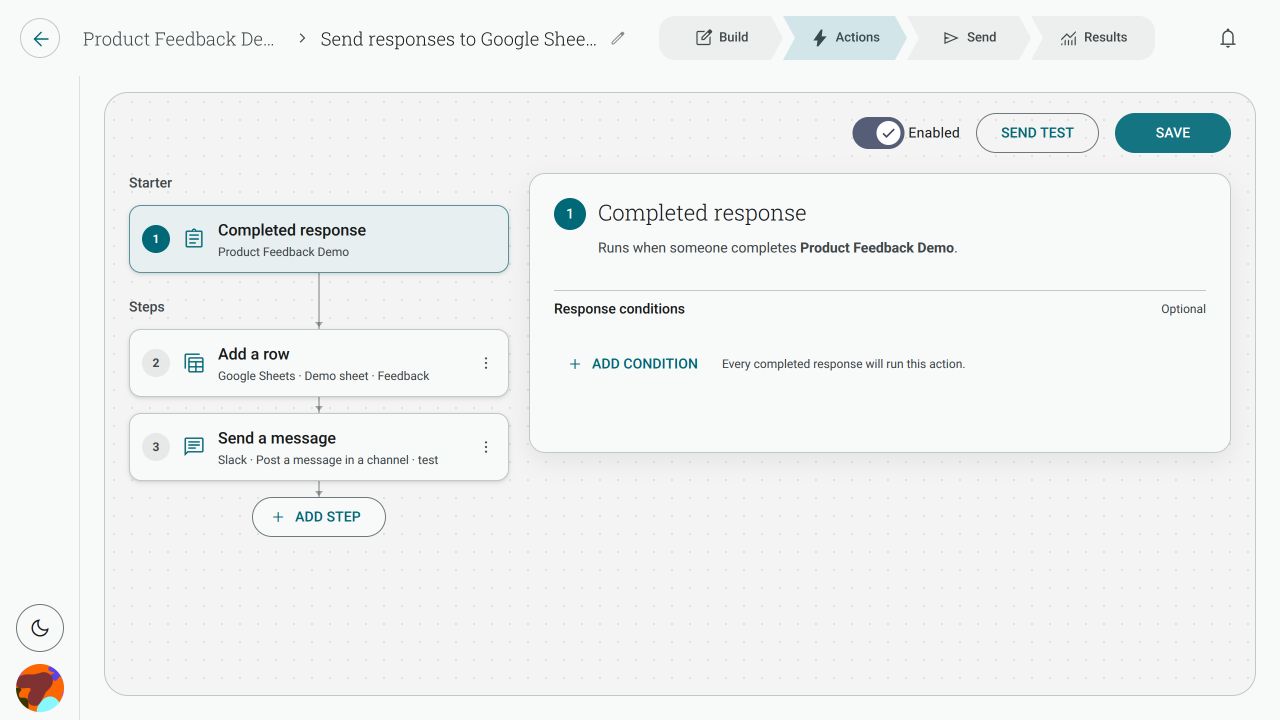
How do I send every form response to a Google Sheet?
Section titled “How do I send every form response to a Google Sheet?”- Open the form’s Actions tab, or go to Actions → New action.
- Choose Completed response as the starter and select your form.
- Click Add step, choose Add a row, then select Google Sheets.
- Choose the Google Sheet file and Sheet.
- Map each destination column to a response variable, contact detail or custom text.
- Save the Action and enable it.
The same outcome can be used with other apps that offer Add a row, such as Excel Online. Check the app card and the connected-app picker for the current list.
Why does it say it cannot write to my sheet?
Section titled “Why does it say it cannot write to my sheet?”The connected account needs edit access to the specific sheet tab. A protected or view-only tab can fail even when the Google account itself is connected correctly. Give that account edit access to the tab, then use Reload destinations or refresh the step and choose the file and tab again.
My sheet has no headings. Why are there no columns to map?
Section titled “My sheet has no headings. Why are there no columns to map?”Add a header row before configuring the step. Shout reads the heading cells as destination columns. If the source does not expose headings, enter the column names manually when the step offers that option.
Which column does each answer go into?
Section titled “Which column does each answer go into?”Map each destination column independently. For example, a sheet with these headings can use the matching response values:
| Sheet column | Map it to |
|---|---|
| First Name | The contact first-name answer |
| Last Name | The contact last-name answer |
| The contact email answer | |
| NPS | The 0–10 NPS answer |
| Product | The Product answer |
You can leave a column as Do not map to omit it from the new row. Use the variable picker rather than copying a question’s wording into the sheet mapping.
Why did a new column appear in my sheet?
Section titled “Why did a new column appear in my sheet?”The connected app may add its own key column so it can identify records it created. Leave that column unmapped; it is managed by the connected app.
Can I update an existing row instead?
Section titled “Can I update an existing row instead?”No. Add a row always creates a new row. Use a step or workflow provided by the destination app if you need a separate update operation.