
Choose who can use a connected app
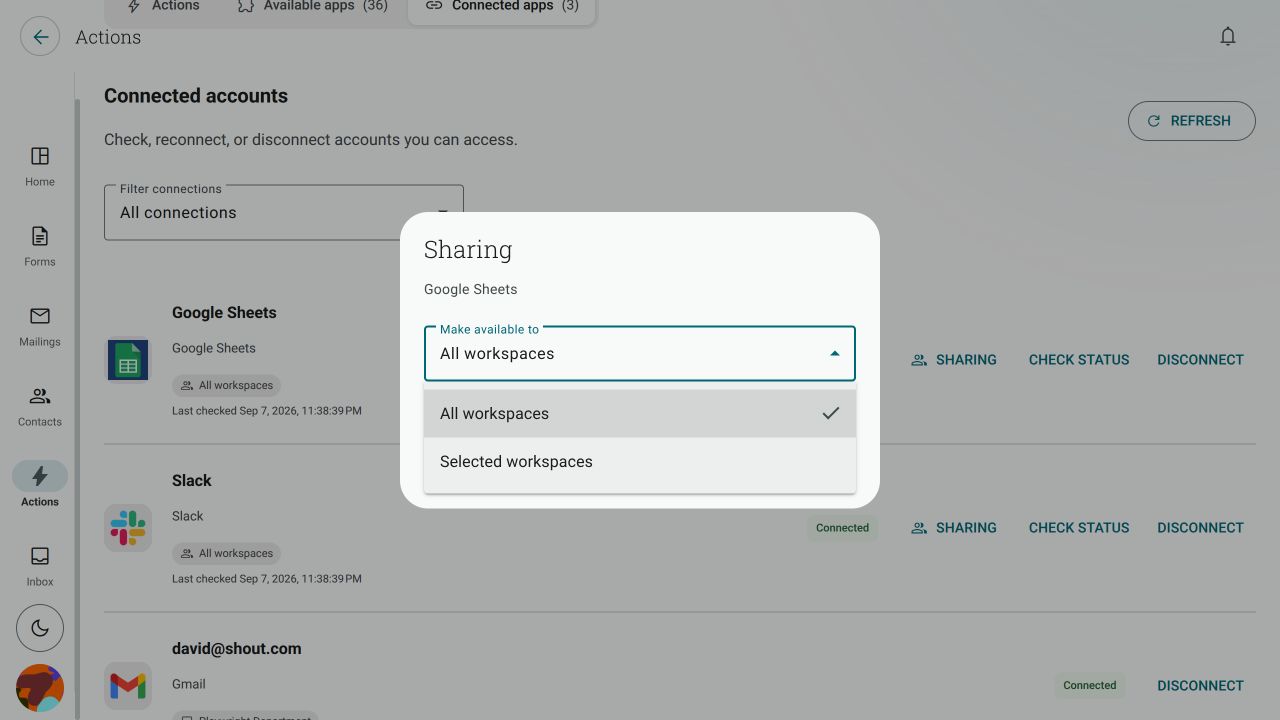
The Make available to setting controls which Shout workspaces can use a connected app. It is separate from the permissions you granted inside the app.
What does Make available to mean?
Section titled “What does Make available to mean?”When you connect an app, choose one of these availability settings:
- All workspaces — members with the required access can use the connection in all your current and future workspaces.
- Selected workspaces — the connection is available only in the workspaces you choose.
- Only me · Personal forms — the connection is available only to you in your personal forms.
The exact choices shown depend on where you start the connection. A connection created for a workspace is scoped to that workspace or to the workspaces you select.
Can a colleague use a connection I set up?
Section titled “Can a colleague use a connection I set up?”Yes, if the connection is shared with their workspace and they have the required access to the form or inbox. They can build an Action using the shared connection without connecting the app again themselves.
Sharing the connection does not give them access to forms, workspaces or app data they cannot already access.
Can I keep a connection out of another workspace?
Section titled “Can I keep a connection out of another workspace?”Yes. Choose Selected workspaces and select only the workspaces that should use the connection. For a connection that must stay personal, choose Only me · Personal forms when that option is available.
An all-workspaces connection does not make a private form available to other people. Private forms use a connection available in that form’s own scope.
Can I change sharing later?
Section titled “Can I change sharing later?”- Go to Actions → Connected apps.
- Find the connection.
- Click Sharing.
- Choose All workspaces or Selected workspaces, then choose the workspaces if prompted.
- Click Save sharing.
Changing sharing affects where the connection can be selected. It does not delete records already sent to the app.