
Send a form response to Slack or Teams
The Send a message step posts a message to a channel in a connected Slack or Microsoft Teams account. The step is named for the outcome, so you can change the app without rebuilding the message step.
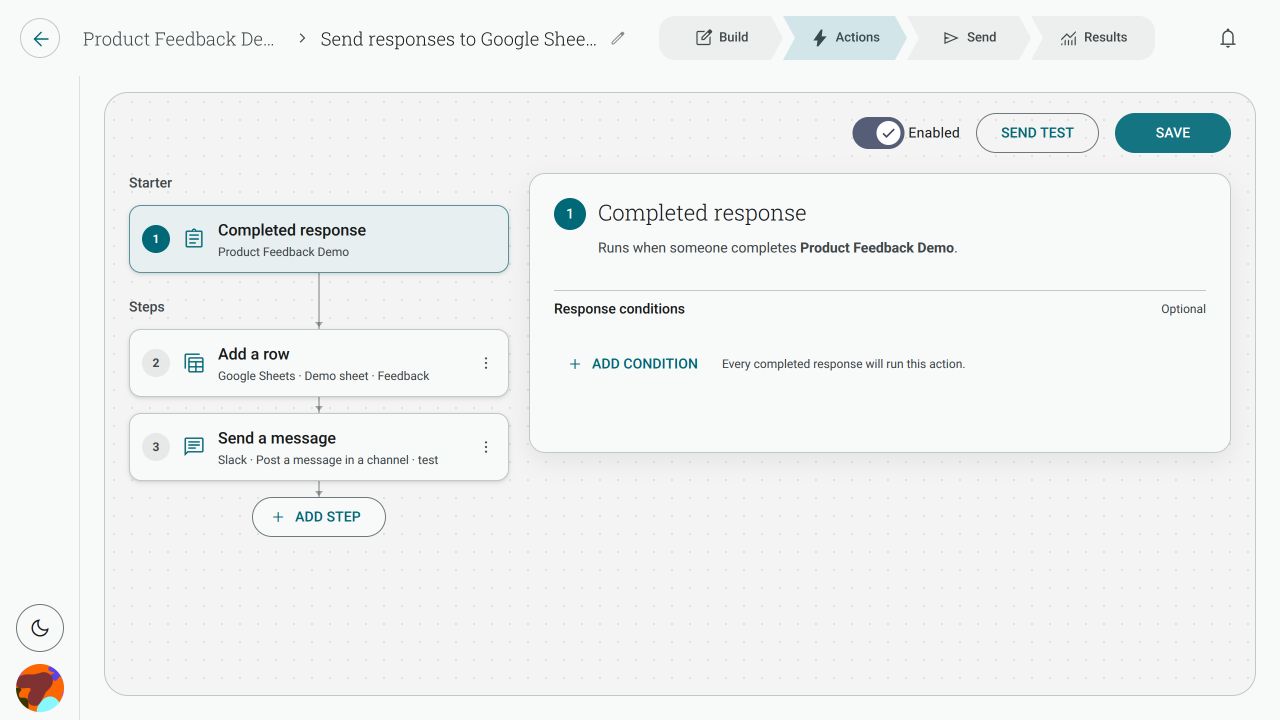
How do I post form responses to a Slack channel?
Section titled “How do I post form responses to a Slack channel?”- Go to Actions → New action, or open the form’s Actions tab.
- Choose Completed response and select the form.
- Click Add step and choose Send a message.
- Select Slack, choose the connected account, then choose the Channel.
- Write the message and use Insert variable to include answers or contact details.
- Save and enable the Action.
For Microsoft Teams, choose Microsoft Teams in the same step and select the team and channel offered by that connection.
How do I choose the channel?
Section titled “How do I choose the channel?”The Channel picker loads channels visible to the connected account. Select the destination, then use Reload destinations if a channel you expect is missing.
If it is still missing, check that the connected Slack account is a member of that channel and that the account has permission to post there. A channel that is private or restricted may not appear; the private-channel lock behaviour has not been verified for every Slack setup.
Can I include answers in the message?
Section titled “Can I include answers in the message?”Yes. Click Insert variable in the message field, then choose Response, Contact or Questions. Pick the answer you want to insert. Empty answers remain empty, so make optional questions clear in the surrounding message.
Can I switch from Slack to Teams without rebuilding the step?
Section titled “Can I switch from Slack to Teams without rebuilding the step?”Yes. Send a message is the outcome and Slack or Teams is the app choice. Open the step, change the connected app, then choose the new destination. Review the message and save the Action again.
Does it run for partial responses?
Section titled “Does it run for partial responses?”No. A completed response starts the Action. Someone who abandons the form does not trigger a message. Add a condition when only some completed responses should be posted.